
My Pioneer Avic D3 install in 2012 Rogue w/ backup camera

Nissan Rogue forum - Includes Nissan Qashqai and Nissan Dualis as well.
User avatar
rdub2k4
Posts: 320
Joined: Sun Nov 25, 2012 3:49 am
Car: 2012 Nissan Rogue SE
2011 Mitsubishi Lancer GTS
Location: San Angelo, TX
Contact:

Post

Hey guys,

I'm an audio guy and have had the pleasure of having this Avic D3 for 3 years now. Gave it to my girlfriend last year in her old car and now it's going in her Rogue. One small problem which I addressed in the other thread regarding dash kits is the 2012 is not available yet. It will be soon, Metra 99-7616. So I bought some ABS plastic and made my own dash kit, which I've done before as I used to install back in the day.

Some info on the backup camera:
It's reeeaallllyyy scattered throughout the site so I hope this kinda clears it up. There's no real "instructions" on how to keep the factory backup camera, but it is very possible.

Here is a pinout of the harness you need to tap into everything. Taken from another thread.

http://postimage.org/image/m8iwv3z5h/

Pin 33 Camera Shield - RCA shielding should be soldered to this.
Pin 34 Camera Signal - RCA signal wire should be soldered to this.
Pin 35 Camera Power supply - 6v power supply to turn on camera should be wired here
Pin 36 Camera Ground Camera does need to be grounded, ground at harness or chassis.
Pin 51 Reverse Signal - Trigger to flip screen to reverse camera.

Ok here's the fun part. The camera is a 6v power supply. I don't have any pictures of what I did cuz I was in a rush, but I basically wired up a 12v to 6v voltage regulator in order to do this. Very easy. I found a how-to on a Toyota forum on how to make one cheap.

http://www.toyotanation.com/forum/270-4 ... tereo.html

Don't mind the wiring part, just pay attention to making this.
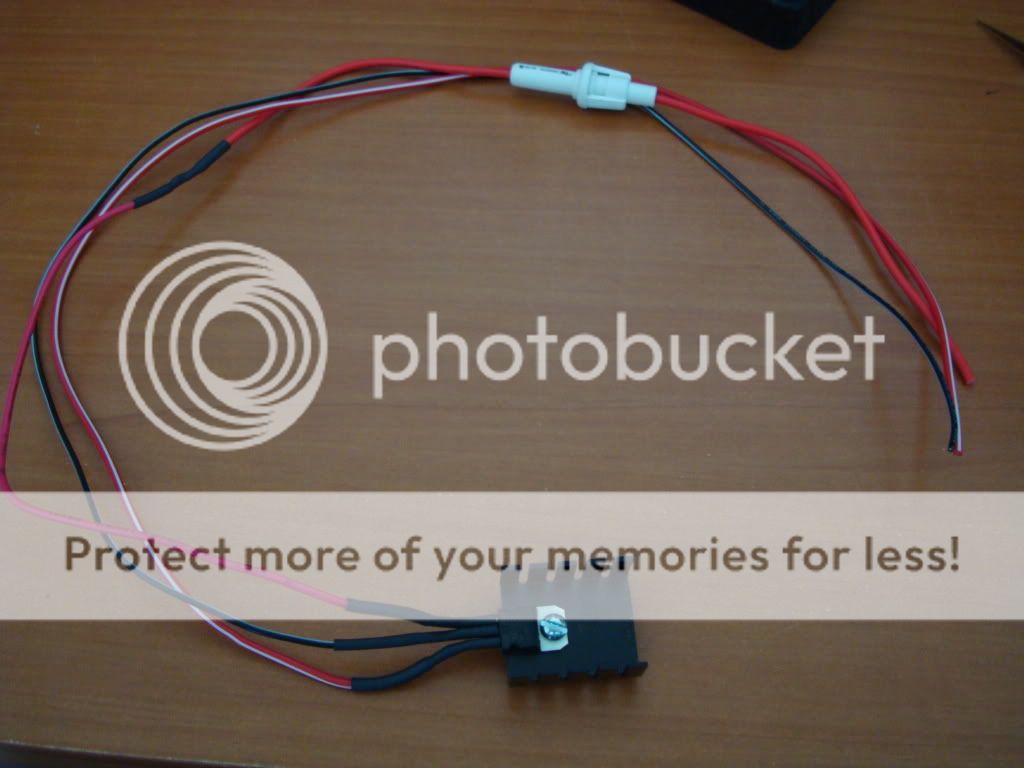
Image

What I did Is i took the Reverse signal wire, wired it to the voltage regulator and to the Pioneer's reverse trigger at the same time. Output of the voltage regulator goes into Pin 35 to power the camera. This way when I put the car in reverse, it powers the camera and also triggers the headunit to flip into reverse camera mode. Works like a charm.

Ghetto pics of my install, I'll take some daytime pics later.

Image

Image

Backup cam showing my Lancer as a Reindeer.

Image

Enjoy! Any questions let me know ;)


Black B15
Posts: 156
Joined: Sat Apr 21, 2012 11:55 am

Post

NICE! Looks good man!

rickrogue
Posts: 36
Joined: Sun Sep 09, 2012 9:17 am
Car: 2011 nissan Rogue

Post

hey, are the rca shielding etc. from the aftermarket deck??

User avatar
ImStricken06
Posts: 4511
Joined: Wed Dec 07, 2011 8:45 am
Car: 2008 Nissan Rogue (sold)
2013 Hyundai Santa Fe
2016 Kia Sorento
Location: Within Range
Contact:

Post

awesome work man. lots of credit to you!

Yev
Posts: 43
Joined: Sat Mar 02, 2013 1:52 pm
Car: Nissan Rogue

Post

Looks great, RDub2K4! I have a question with regards to the backup camera. I had the Pioneer AVIC X940BT and Boyo VTL420SR installed in my 2008 Nissan Rogue S. The installation was performed by a body shop that specializes in custom bumpers, audio installs, etc. The power for the back-up camera was connected to the reverse light, but for some reason my image sometimes appears inverted and the grid lines are not displayed on the head unit screen. I called the body shop and told them to look at it and they blamed the control unit for the intermittent problem. However, I feel that it is in fact the inconsistent power from the rear lights that is causing the problem. What do you think?

*Will post pics in case someone else on this forum has a similar issue.

User avatar
rdub2k4
Posts: 320
Joined: Sun Nov 25, 2012 3:49 am
Car: 2012 Nissan Rogue SE
2011 Mitsubishi Lancer GTS
Location: San Angelo, TX
Contact:

Post

Yev wrote:Looks great, RDub2K4! I have a question with regards to the backup camera. I had the Pioneer AVIC X940BT and Boyo VTL420SR installed in my 2008 Nissan Rogue S. The installation was performed by a body shop that specializes in custom bumpers, audio installs, etc. The power for the back-up camera was connected to the reverse light, but for some reason my image sometimes appears inverted and the grid lines are not displayed on the head unit screen. I called the body shop and told them to look at it and they blamed the control unit for the intermittent problem. However, I feel that it is in fact the inconsistent power from the rear lights that is causing the problem. What do you think?

*Will post pics in case someone else on this forum has a similar issue.
The grid lines are due to the unit IIRC. I had the grid lines on my factory backup with the stock headunit, but once I put in the Pioneer the lines went away.

There is a way to correct the "mirror" image on the reverse cam, I'll have to look it up. My power is also connected to my reverse lights.

Yev
Posts: 43
Joined: Sat Mar 02, 2013 1:52 pm
Car: Nissan Rogue

Post


User avatar
rdub2k4
Posts: 320
Joined: Sun Nov 25, 2012 3:49 am
Car: 2012 Nissan Rogue SE
2011 Mitsubishi Lancer GTS
Location: San Angelo, TX
Contact:

Post

rickrogue wrote:hey, are the rca shielding etc. from the aftermarket deck??
Did not even see this, sorry man. The shielding and the RCA signal is from a male RCA end. I cut an older RCA cable I had and stripped the end of it. The signal and shield wires I soldered to the vehicle's main harness. The RCA end plugged into the Headunit's RCA inputs.


@ Yev - Imma look into that. That's very strange.

zummuz
Posts: 15
Joined: Sun Mar 03, 2013 6:31 pm
Car: Nissan Qashqai

Post

@yev: sorry mate but your camera points to nowhere. It should see the back and the lower part of the rear bumper not the store across the street. Also the guiding lines are useless in your case because they are just lines in the air, not on the road.
You should use one of those cameras that replace one of the rear light for plates instead of using that one that you used. Maybe you wanted to spy on your neighbors? :chuckle:

Yev
Posts: 43
Joined: Sat Mar 02, 2013 1:52 pm
Car: Nissan Rogue

Post

zummuz - Thank you for your feedback. I do agree that it would be best to have the camera view start from the rear bumper...but it seems that the angle I have set is the max. With regards to the "guide lines", they are actually parking sensor grids. If you look at the image of my Boyo back-up camera, you will see two circles on either side. Those are the parking sensors...I also get an audible warning if I get too close to the next car's bumper, for instance, "stop, stop, 2.5 feet!"....and no, I do not spy on my neighbors. LOL!
Last edited by Yev on Thu Apr 18, 2013 11:15 am, edited 1 time in total.

Yev
Posts: 43
Joined: Sat Mar 02, 2013 1:52 pm
Car: Nissan Rogue

Post

RDUB2K4 - Thanks for your help, buddy :)

User avatar
rdub2k4
Posts: 320
Joined: Sun Nov 25, 2012 3:49 am
Car: 2012 Nissan Rogue SE
2011 Mitsubishi Lancer GTS
Location: San Angelo, TX
Contact:

Post

Yev wrote:RDUB2K4 - Thanks for your help, buddy :)

I did a little reading, here's my take on it. I don't think the X940BT likes the power input from your rear lights, so it acts a little wonky. Found someone having a similar problem on AVIC411.com, but their screen would go black instead of flip.

My suggestion:

Run a constant power source to your backup camera (use red wire from back of headunit, tap in and run to camera power). This way any time the vehicle is on, the camera is "on". The X940BT won't flip to it unless you tell it, here's how.

Use a relay to trigger your reverse signal.

Image

Pin 85 - Ground
Pin 86 - Positive from reverse light
Pin 30 - Ground
Pin 87 - Connect to reverse signal input on headunit.

Switch polarity on headunit to GND instead of PWR in settings.

This way, when you put the car in reverse, the reverse lights will trigger the relay, relay clicks and grounds Pin 87. Deck will trigger "show camera" and it'll flip the screen. With the camera already getting power, it shouldn't get messed up anymore.

zummuz
Posts: 15
Joined: Sun Mar 03, 2013 6:31 pm
Car: Nissan Qashqai

Post

@yev: OK. Thanks for good feedback. If I can help, you can always contact me even on PM.
@ rdub2k4: reverse cameras don't like constant power on setting. The power source is not OK to provide a constant power on to the camera all the time when engine is on. This is 100% verified with cheap chinese camera. The power source is overheating since the camera need 5-6V and the reverse input is always 12V. The difference is transforming to heat in this process and reverse camera are hungry in terms of consumption. The higher the consumption, the higher the heat produced.
This can be bypass in 2 ways.
1. A good camera. Panasonic for example which have a good power source unit.
2. Use the camera output from head-unit. Some good headunits provide a good stabilised 5-6V for feeding the reverse camera.

User avatar
rdub2k4
Posts: 320
Joined: Sun Nov 25, 2012 3:49 am
Car: 2012 Nissan Rogue SE
2011 Mitsubishi Lancer GTS
Location: San Angelo, TX
Contact:

Post

zummuz wrote:@yev: OK. Thanks for good feedback. If I can help, you can always contact me even on PM.
@ rdub2k4: reverse cameras don't like constant power on setting. The power source is not OK to provide a constant power on to the camera all the time when engine is on. This is 100% verified with cheap chinese camera. The power source is overheating since the camera need 5-6V and the reverse input is always 12V. The difference is transforming to heat in this process and reverse camera are hungry in terms of consumption. The higher the consumption, the higher the heat produced.
This can be bypass in 2 ways.
1. A good camera. Panasonic for example which have a good power source unit.
2. Use the camera output from head-unit. Some good headunits provide a good stabilised 5-6V for feeding the reverse camera.
I'd have to look up the specs on his camera. If it requires a 5-6volt, the voltage regulator I made above would work just fine.


***edit***
the VTL420SR requires a 12V DC power source.

Also, the camera could be the culprit. Found a review of this same camera saying the image appears upside down 80% of the time when they put it in reverse. I really do think it needs a strong, stable power source. Either a relay to give it 12V+ from the battery, or a steady on.

zummuz
Posts: 15
Joined: Sun Mar 03, 2013 6:31 pm
Car: Nissan Qashqai

Post

All the reverse camera need 5-6V. Since the automotive use 12V ( in fact 13-14V) they use stepping down convertors from 12-13-14V to 5-6V. All the difference is transformed to heat. If a regular camera will use 0.2A, then you will have a 0.2 multiplied by 6 to 9 times (12-6 or 14-5). This means 1.2W to 1.8W heat generator. All the time when camera is on.

User avatar
rdub2k4
Posts: 320
Joined: Sun Nov 25, 2012 3:49 am
Car: 2012 Nissan Rogue SE
2011 Mitsubishi Lancer GTS
Location: San Angelo, TX
Contact:

Post

Will it be a problem if he runs a 6v power source to a 6v voltage converter? I'm not sure how that works.

zummuz
Posts: 15
Joined: Sun Mar 03, 2013 6:31 pm
Car: Nissan Qashqai

Post

@yev: the camera that you bought (VTL420SR) is made for cars with plates on rear bumper at 10-20 inch to the ground to point it right. That's why also have proximity sensors attached to the same plastic at the same level. Rogue has the plates at almost 40 inch to the ground, this is why the camera should point to an angle slight to the ground and not paralel with the ground level. The original camera point to the ground in the back.

@rdub2k4: reverse camera is not designated to stay alive all the time when ignition in on. For this goal to be achived the camera must be a very good quality, and the power source to be strong enough to dissipate the heat during the activity. All this should come with a higher price.
The solution - either buy and use a very cheap camera - at 20$ or buy the original one from a scrap parking.

@all: sorry for my english. I'm just try to help.

Yev
Posts: 43
Joined: Sat Mar 02, 2013 1:52 pm
Car: Nissan Rogue

Post

Zummuz & rdub2k4 - Thanks a bunch for all your help. I truly appreciate it! I find it quite strange that the Boyo back-up camera did not specify that the clearance up-to the license plate mount can only be 10-20 inches. With regards to back-up camera quality, I did try to find OEM parts as you suggested, Zummuz. However, the back-up camera for license plate lights are not compatible with the 2008 Nissan Rogue. Not sure why. I even checked out the Qashqai...same story. Hence, I went with the Boyo at $150.00 USD. To be honest, I can live without the back-up camera....I haven't had any problems reversing or parking. However, it is quite useful during the night or when hitching a trailer.

zummuz
Posts: 15
Joined: Sun Mar 03, 2013 6:31 pm
Car: Nissan Qashqai

Post

It looks that Nissan Teana has the same license plate lamp as Nissan Rogue.
All you have to do folks is unscrew one of those lamps and compare with one of those to see which one is the right shape.
http://www.ebay.com/sch/i.html?_trksid= ... &_from=R40
As you can see the price range is 20-35$. Cheaper than that should be free :chuckle:

User avatar
rdub2k4
Posts: 320
Joined: Sun Nov 25, 2012 3:49 am
Car: 2012 Nissan Rogue SE
2011 Mitsubishi Lancer GTS
Location: San Angelo, TX
Contact:

Post

Finally got around to ordering the proper dash kit. Fits better then my homemade one.

Image

rickrogue
Posts: 36
Joined: Sun Sep 09, 2012 9:17 am
Car: 2011 nissan Rogue

Post

got to install kenwood dnx 6990HD with working backup camera... thanks rdub...

User avatar
rdub2k4
Posts: 320
Joined: Sun Nov 25, 2012 3:49 am
Car: 2012 Nissan Rogue SE
2011 Mitsubishi Lancer GTS
Location: San Angelo, TX
Contact:

Post

rickrogue wrote:got to install kenwood dnx 6990HD with working backup camera... thanks rdub...
No prob man! Glad to hear it :D

radparker
Posts: 12
Joined: Sun Oct 17, 2010 6:39 pm
Car: 2012 Nissan Rogue 2.5 SL

Post

Love this, it looks great. So I'm going to stick with the stock head unit in our 2012 Rogue, because I want one that better integrates with the iPhone 5 and it sounds like the Panasonic App Radio is hit or miss right now. And new stuff is coming soon, sounds like. But in the mean time, any idea where I can cram an amp and a sub in mine? I want a sub badly but I don't want to lose cargo space. In my 2004 Saturn Vue, I was able to fit dual amps under the back seat, but it doesn't look like there's any clearance there on the Rogue, boo.

User avatar
rdub2k4
Posts: 320
Joined: Sun Nov 25, 2012 3:49 am
Car: 2012 Nissan Rogue SE
2011 Mitsubishi Lancer GTS
Location: San Angelo, TX
Contact:

Post

radparker wrote:Love this, it looks great. So I'm going to stick with the stock head unit in our 2012 Rogue, because I want one that better integrates with the iPhone 5 and it sounds like the Panasonic App Radio is hit or miss right now. And new stuff is coming soon, sounds like. But in the mean time, any idea where I can cram an amp and a sub in mine? I want a sub badly but I don't want to lose cargo space. In my 2004 Saturn Vue, I was able to fit dual amps under the back seat, but it doesn't look like there's any clearance there on the Rogue, boo.
I'm a huge fan of the Pioneer AVH-X8500BH. My friend has the 8400 and it works awesome with his Iphone4S.

I've yet to look into installing an amp/sub combo into the Rogue, but I'm really considering running 2 8's where the rear cargo tray is, near the spare tire. Custom box and blow the port forward. Should be nice.

Need to get out the measuring tape and see if I can get these to work.

http://store.soundsolutionsaudio.com/pr ... eries.html

skatze
Posts: 8
Joined: Fri Mar 01, 2013 7:49 pm
Car: 2013 Nissan Rogue SE AWD

Post

Sooooo, I'm guessing that if I upgrade my base stereo on my 2013 Nissan Special edition with standard stereo (no gps), to a gps in-dash model, I "CAN" keep my rear view camera...? But, if so, what, if anything do I need to have the Best Buy installers do to prevent the overheating that others allude to?

I appreciate your thoughts and experience. Also, I'm looking at a Kenwood model that allows for a "Front view" camera as well as the rear-view. Do you know if the factory rear view can be used along with a new Kenwood front view camera? I appreciate anyone..and everyone's guidance.

Thanks,

Steve

User avatar
Rogue One
Administrator
Posts: 7945
Joined: Tue Jun 14, 2011 10:15 pm
Car: 2011 Nissan Rogue SL
2012 Nissan Rogue SL
2022 Honda Pilot SE
2025 Honda CR-V Sport L
Location: Florida, USA

Post

skatze wrote:Sooooo, I'm guessing that if I upgrade my base stereo on my 2013 Nissan Special edition with standard stereo (no gps), to a gps in-dash model, I "CAN" keep my rear view camera...? But, if so, what, if anything do I need to have the Best Buy installers do to prevent the overheating that others allude to?

I appreciate your thoughts and experience. Also, I'm looking at a Kenwood model that allows for a "Front view" camera as well as the rear-view. Do you know if the factory rear view can be used along with a new Kenwood front view camera? I appreciate anyone..and everyone's guidance.

Thanks,

Steve
Check out this thread aftermarket-stereo-w-surround-view-t570115.html
I posted a reply I got from Pioneer when I contacted them about swapping in one of their head units for the stock unit with around view camera system. Having dealt Best Buy and not trusting them for something like this, I might suggest trying to find a shop that specializes in car stereo installs.

skatze
Posts: 8
Joined: Fri Mar 01, 2013 7:49 pm
Car: 2013 Nissan Rogue SE AWD

Post

Thanks, I checked it out. But, I only have a rear view camera, not all around. I have another question. What about the Sirius component? Is there any way to use my existing sirius/fm antenna in an aftermarket upgrade instead of having to have an installer run "another" additional sirius antenna?

Thanks again!

User avatar
Rogue One
Administrator
Posts: 7945
Joined: Tue Jun 14, 2011 10:15 pm
Car: 2011 Nissan Rogue SL
2012 Nissan Rogue SL
2022 Honda Pilot SE
2025 Honda CR-V Sport L
Location: Florida, USA

Post

Thought you might only have the standard rear view, which actually works in your favor. I seem to recall someone was able to modify their Sat radio connection to fit an aftermarket unit. May take a bit of searching to find.

User avatar
rdub2k4
Posts: 320
Joined: Sun Nov 25, 2012 3:49 am
Car: 2012 Nissan Rogue SE
2011 Mitsubishi Lancer GTS
Location: San Angelo, TX
Contact:

Post

skatze wrote:Thanks, I checked it out. But, I only have a rear view camera, not all around. I have another question. What about the Sirius component? Is there any way to use my existing sirius/fm antenna in an aftermarket upgrade instead of having to have an installer run "another" additional sirius antenna?

Thanks again!
I have not messed with the Sirius/XM antenna at this time because my older headunit does not have it built in. It's hard to track down older components and right now it's not a priority. I'm pretty sure there is a way to splice into the antenna, I just haven't tried it myself.

I only have the rear view as well, no Around view. I personally have not experienced any overheating issues with the way mine's setup. The heatsink absorbs the heat pretty well and my camera only engages when the car is in reverse. You should have no issues with having Kenwood's front view camera and your factory backup cam.

I'm not sure if a standard installer would know how to tap into the factory back up cam. It's a bit of a pain but do-able. You can always link em to this thread.

skatze
Posts: 8
Joined: Fri Mar 01, 2013 7:49 pm
Car: 2013 Nissan Rogue SE AWD

Post

Thanks folks!

Another question along the same line. If I follow the links on this page re: keeping my rearview factory cam with aftermarket stereo/gps, does anyone know what I can do if I want to have the camera available regardless of using the "car in reverse" option? In other words, what if I want to be able to use the camera on an aftermarket at any time, regardless of reverse? I gather that means current would run to it full-time and that raises the issue about heat? What can I do to resolve the extra heat generated?

My goal is to keep my rearview camera, upgrade to Kenwood's DNX890 HD, and add their multi-view camera to the front. From what I gather, I should be able to switch between rearview and frontview cameras using the touchscreen of the 890. I wanted to get Alpine's INE-W927HD. However, apparently, the stereo's depth is just slightly over the allowable depth for a 2013 Nissan Rogue.

My other issue/question regards using the recommended Idatalink' Maestro ADS-MRR or the Axxess version? From what I see, it looks like Kenwood may have limited capability with the Rogue's bluetooth steering wheel call features? Pioneer compatible stereos seem to have more? Anyone have experience with either?

Idatalink Maestro's pairing chart shows the following:

Kenwood radio functions include:

Volume up/volume down
Track up/down
Source
Mute
Play/pause
Folder up/am
Folder down/fm
up/disk up
down/disk down
Direct
Phone
Repeat
Sound

Pioneer shows:

Volume up/down
Seek up/down
Source
Mute
Band
Preset up/down
Display info
Phone menu
Answer call
Hang Up
Voice recognition

My big worry is that I won't be able to use all the steering wheel bluetooth functions correctly.

Again, I appreciate everyone's advice and thoughts.

Sincerely,

Steve


Return to “Rogue Forum”