

iSimple Gateway, antenna cable, and HDRT

From top to bottom: HDRT, connector from HDRT to iGateway, antenna cable, iGateway, head unit harness, AUX input, iPhone input
The gateway has only two DIN sockets, so if you have both iPhone and HDRT, you will lose the ability to use the 3.5mm AUX input connector that comes with the kit.
I did not want to put my phone in the armrest, and I didn't want to drill holes anywhere. My solution was to remove the cigarette lighter and have the connector come out of the lighter socket. My phone goes in my unused ashtray.

The iPhone connector rests where the cigarette lighter used to be.

First step is to remove the cup holder. You can pull it up without using tools.

Pull back and down to loosen boot, then pull out clip to remove shift knob.
Here is the underside of the shift lever cover. I pulled the green wire from the plug so there wouldn't be a short circuit with the cigarette lighter removed.
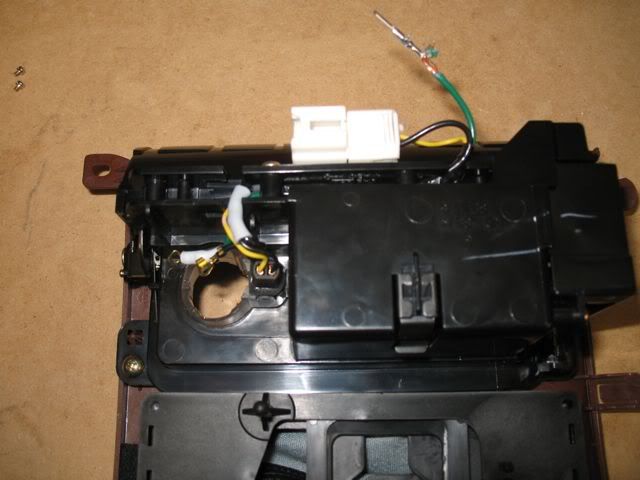
Cigarette lighter removed. Green wire pulled from lighter plug.

Head unit is held in by four screws.

Head unit removed.
I put the HDRT in the cavity under the head unit. Instead of securing it with zip ties, I decided to use leftover foam from an old Pelican case. The foam on either side of the HDRT prevents it from moving laterally, and the back of the head unit prevents the HDRT from moving front to back.

HDRT nestled in foam behind the head unit.
The space between the shift lever assembly and the console is just right to accommodate the gateway box. Before I did so, I put some more foam in the cavity underneath it. I wanted to prevent the gateway from going down into the cavity. It looked like it would be difficult to get it out if it fell down in there.

iGateway wedged in front of shift lever assembly.
While installing the unit, there was a time when the gateway was not recognizing the devices plugged into it. The troubleshooting instructions said to unplug the power from the gateway, wait 5 minutes, and then plug it back in. I found that I had to wait for approximately 10 minutes for the capacitors to completely drain before things started working.

Gateway in front of shift lever assembly, and extra cable length zip tied out of the way.

Final setup. Note LED light channel around cigarette lighter is lit when headlights are on.

I see this error message infrequently, and it can be ignored.
My overall impression: I am satisfied with the unit. The user interface can be klunky because the gateway impersonates a satellite tuner, so you put the head unit into satellite mode and then listen to either the iPhone or HD radio through that mode and repurpose the standard buttons for other things. I do not select artist, track, etc from the head unit because it looks very complex to me. I'm used to selecting music on my phone or giving it voice commands because my previous car only had an analog AUX input, so it's not a big deal for me. The iPhone sound quality is excellent, and my phone charges while in the car.
I bought the gateway thinking that the iPhone would be my primary input. I tacked-on the HDRT to my order thinking it would be a toy. It turns out I like HD radio more than I thought I would. Some stations have multiple channels within each station, so there is more variety within the stations I like. The HD radio will tune to HD when it is available, otherwise it will fall back on regular FM. If you get into an area with spotty HD coverage, you will hear (and see on the screen) the tuner switching back and forth between regular FM and HD. News and talk shows sound a little weird because you can hear the dialog being compressed, but overall I really like the way HD radio sounds.
This recently purchased M35 is my first Infiniti, and I love it. I knew when I bought the car that I would have to install an aftermarket interface for my iPhone since it doesn't have an AUX input (duh). It was worth it to me to get a good price on the car and spend $200 and a Saturday afternoon installing an aftermarket kit versus getting a newer model car with a better stereo. Is this the greatest solution ever? No, but it's good enough for me!
Pros:
- iPhone sounds great.
HD radio sounds great and gives me more listening choices.
- Cumbersome to switch between HD radio and iPhone (press Radio button multiple times, turn the Tuner knob, then wait or press another button).
Cumbersome to switch between HD radio stations (press and hold, then use tuner).
Presets 1-6 and ABC selector will no longer work for HD radio stations. Presets 1-6 only control the CD changer now.
iPhone music volume needs to be turned up a little.
Could somebody please hire someone in marketing to market this device? "The iSimple Gateway from Peripheral Technology, made by Peripheral Electronics, A Division of AAMP of America, part number PXAMG, packaged as ISNI572". Are you a company, product line, brand, distributor, or part number? Very confusing.
References:
http://www.youtube.com/watch?v=13nMqK3Z ... ure=fvwrel
http://www.youtube.com/watch?v=Ai5sr6kQOjw
has-any-did-an-ipod-intergretion-kit-to ... 34932.html
aux-ipod-input-2006-2007-m35-t514994.html
http://philip.greenspun.com/materialism ... finiti-m35