I have a 2006 Infiniti M35 Sport WITHOUT the navigation and the entertainment package- so that means I do not have the auxiliary & RCA inputs on back of the arm rest, no DVD player and no stock navigation.
Here what I am trying to accomplish: 1. First of all I want to integrate aux support so I can hook up my smartphone (HTC EVO 4G) to listen to songs from pandora, personal library etc. Alternatively, I am also open to upgrading the onboard car's bluetooth from HFP to A2DP bluetooth profile (that lets you transfer files) so I can directly stream music over bluetooth from my phone. But I would prefer the hardwired aux input because of the song clarity (most of my songs play at a bitrate of 256 Kbps)
2. Here is the hard part: Since I have a smartphone I want to be able to watch videos, movies (from netflix app over 4G or personal library), google navigation app, via the HDMI out from the HTC EVO 4G. I just want to project what ever is on my phone to the onboard 7" screen via HDMI out from my phone Does anyone know what type of video inputs does the onboard 7" color screen support ?

2006 Infiniti M35 sport video & audio mod
-
ss_freestyler
- Posts: 4
- Joined: Sun Sep 04, 2011 9:38 am
- Car: 2006 Infiniti M35 Sport
2006 Infiniti M35 sport video & audio mod
Last edited by ss_freestyler on Wed Sep 07, 2011 10:08 pm, edited 1 time in total.
-
cruzad3r
- Posts: 1340
- Joined: Fri Mar 05, 2010 6:34 pm
- Car: 2006 Infiniti M35x fully loaded
- Location: CT
Re: 2006 Infiniti M35 sport vide & audio mod
without an AUX line in, i don't see how you're going to accomplish this. i'm hunting down the right A2DP dongle as i'm trying to do this myself. the hardest problem is tying in the power line as everything else is plug and play. there are several folks on the infiniti m35 forums reported successfully done this (freshalloy and nicoclub). however they didn't go into a full dyi tutorial. do some more reading and focus on the PA15-INFI plug in, that's might be a good start.
good luck and report back your solution.
good luck and report back your solution.
-
The00Dustin
- Posts: 1041
- Joined: Mon Jun 29, 2009 4:05 am
- Car: 2006 Infiniti M45
- Location: Bloomington, IN
Re: 2006 Infiniti M35 sport vide & audio mod
If you want to use HDMI, you will have to get a digital to analog HDMI to RCA converter. These do exist, but they are expensive. If your phone has an option to output video in analog with an adapter, that should be significantly less expensive and simpler.
-
ss_freestyler
- Posts: 4
- Joined: Sun Sep 04, 2011 9:38 am
- Car: 2006 Infiniti M35 Sport
Re: 2006 Infiniti M35 sport vide & audio mod
@jayfox911: thanks for posting your comments, it solves the audio part of the problem.
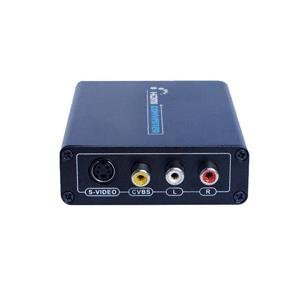
For video I have found couple of aftermarket products that will do the trick. If you want to use your HTC EVO - you will need micro HDMI to HDMI cable and from HDMI you will need an adapter to convert to composite video. You will find plenty on amazon or ebay just search HDMI to composite video converter. Here's one:
http://www.amazon.com/HDMI-Composite-S- ... B0047PDBP0
Solution A: from Av electronics webpage: http://avelectronic.com/products.htm ph: 770-418-1793
They have 4 different plug&play interface systems available for your 2006 M35 without Nav:
1. Low End (always Require power) Navigation Video/Camera Interface is $200.00 (2 video inputs, second input can be use for automatic backup camera or trigger with on/off switch).
2. Budget Navigation Video/Camera Interface is $250.00 (2 video inputs, second input can be use for automatic backup camera or trigger with on/off switch).
3. (Recommended) New Navigation Dual Video/Camera interface is $275.00 (2 Video inputs, 1 Video output, 1 automatic camera input; Video 1 & 2 can be controlled by the included IR Remote or Button Switch).
This is one is cool , you will get a remote to switch between video inputs. Other companies will give you this $1 toggle switch.
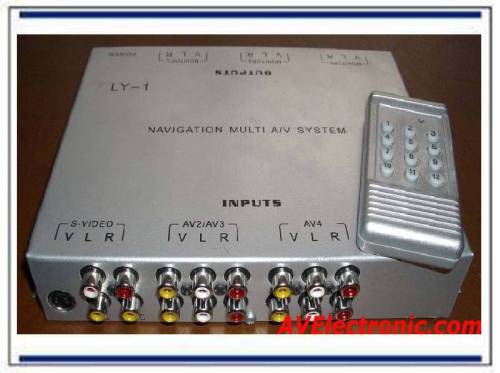
4. Navigation Multi Video Switcher System is $550.00 (4 AV inputs, 4 independent AV outputs, 3 camera inputs, S-Video for Car-PC, and RF Remote).
Solution B:
http://www.tvandnav2go.com/infiniti_nis ... ations.php

Solution C:
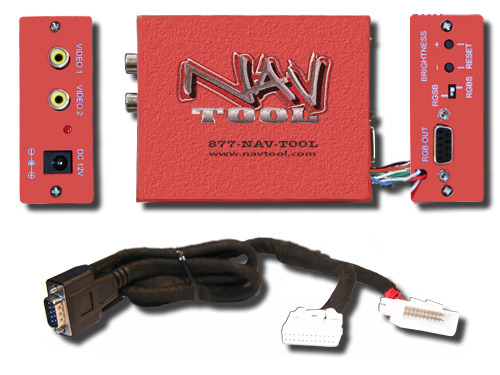
http://www.navtool.com/
For those who have the navigation unit will need to bypass the safety feature (brake pedal & speed sensor). On some of the above product this is built in. Just ask the customer rep whether their product will support video on the run. If they dont support then get this http://www.kptechnologies.com/products.php#/6
After going through all this, I learn that my HTC EVO does not support full HDMI mirroring FML Now I need to root my phone!!
For video I have found couple of aftermarket products that will do the trick. If you want to use your HTC EVO - you will need micro HDMI to HDMI cable and from HDMI you will need an adapter to convert to composite video. You will find plenty on amazon or ebay just search HDMI to composite video converter. Here's one:
http://www.amazon.com/HDMI-Composite-S- ... B0047PDBP0
Solution A: from Av electronics webpage: http://avelectronic.com/products.htm ph: 770-418-1793
They have 4 different plug&play interface systems available for your 2006 M35 without Nav:
1. Low End (always Require power) Navigation Video/Camera Interface is $200.00 (2 video inputs, second input can be use for automatic backup camera or trigger with on/off switch).
2. Budget Navigation Video/Camera Interface is $250.00 (2 video inputs, second input can be use for automatic backup camera or trigger with on/off switch).
3. (Recommended) New Navigation Dual Video/Camera interface is $275.00 (2 Video inputs, 1 Video output, 1 automatic camera input; Video 1 & 2 can be controlled by the included IR Remote or Button Switch).
This is one is cool , you will get a remote to switch between video inputs. Other companies will give you this $1 toggle switch.
4. Navigation Multi Video Switcher System is $550.00 (4 AV inputs, 4 independent AV outputs, 3 camera inputs, S-Video for Car-PC, and RF Remote).
Solution B:
http://www.tvandnav2go.com/infiniti_nis ... ations.php
Solution C:
http://www.navtool.com/
For those who have the navigation unit will need to bypass the safety feature (brake pedal & speed sensor). On some of the above product this is built in. Just ask the customer rep whether their product will support video on the run. If they dont support then get this http://www.kptechnologies.com/products.php#/6
After going through all this, I learn that my HTC EVO does not support full HDMI mirroring FML Now I need to root my phone!!
Re: 2006 Infiniti M35 sport video & audio mod
Let us know how it works out. it would be cool to have video playing from the phone.
I thought you could use the rear inputs (under the center console) even if you do not have the Adv Tech package. You would have to get the adapter or cut wires but i thought it can display video onto the nav screen?
I thought you could use the rear inputs (under the center console) even if you do not have the Adv Tech package. You would have to get the adapter or cut wires but i thought it can display video onto the nav screen?
-
Ilya

- Moderator
- Posts: 9209
- Joined: Fri Apr 23, 2010 11:20 pm
- Car: 2011 M56x but I spend a lot of time on my 2015 Kawasaki Vulcan S. Former owner of a 2007 M35x. Also take care of my wife's 2016 QX60.
- Location: Charlotte, NC
- Contact:
Re: 2006 Infiniti M35 sport video & audio mod
Why not just get a USA Spec PA15-NIS or PA15-INFI and connect the AUX that way? Easier and probably cheaper. And sounds great. You see my review here:
usa-spec-pa15-nis-ipod-adapter-review-t ... hilit=pa15
usa-spec-pa15-nis-ipod-adapter-review-t ... hilit=pa15
Re: 2006 Infiniti M35 sport video & audio mod
That doesnt have video to the nav screen.IlyaKol wrote:Why not just get a USA Spec PA15-NIS or PA15-INFI and connect the AUX that way? Easier and probably cheaper. And sounds great. You see my review here:
usa-spec-pa15-nis-ipod-adapter-review-t ... hilit=pa15
-
Ilya
- Moderator
- Posts: 9209
- Joined: Fri Apr 23, 2010 11:20 pm
- Car: 2011 M56x but I spend a lot of time on my 2015 Kawasaki Vulcan S. Former owner of a 2007 M35x. Also take care of my wife's 2016 QX60.
- Location: Charlotte, NC
- Contact:
Re: 2006 Infiniti M35 sport video & audio mod
I was speaking to #1, not #2. Personally, I couldn't be bothered with all that jazz.
Get a simple 10" Tablet and the USA Spec. PA15-NIS or INFI and call it a day.
See my video here of that setup:
http://youtu.be/yKJYYk6eQcc
It's portable, so you can use it anywhere (the tablet) and the screen is bigger than both the EVO (I have the 3D) and the M screen. Not to mention it's just a simple install for the PA15 and the AUX cable.
Get a simple 10" Tablet and the USA Spec. PA15-NIS or INFI and call it a day.
See my video here of that setup:
http://youtu.be/yKJYYk6eQcc
It's portable, so you can use it anywhere (the tablet) and the screen is bigger than both the EVO (I have the 3D) and the M screen. Not to mention it's just a simple install for the PA15 and the AUX cable.
-
ss_freestyler
- Posts: 4
- Joined: Sun Sep 04, 2011 9:38 am
- Car: 2006 Infiniti M35 Sport
Re: 2006 Infiniti M35 sport video & audio mod
IlyaKol wrote:I was speaking to #1, not #2. Personally, I couldn't be bothered with all that jazz.
Get a simple 10" Tablet and the USA Spec. PA15-NIS or INFI and call it a day.
See my video here of that setup:
http://youtu.be/yKJYYk6eQcc
It's portable, so you can use it anywhere (the tablet) and the screen is bigger than both the EVO (I have the 3D) and the M screen. Not to mention it's just a simple install for the PA15 and the AUX cable.
This would be a good alternative but not an elegant solution for my video problem. I think I might seriously consider your idea because the cost of the video adapters is almost equivalent to an ipad 2!!! I can just mooch off 4G data from my EVO. But where would you mount this massive 10" screen ?? please let me know if you guys know any good-after market hardware kit that would let me install it in a strategic place
I love the OBD-II integration to these tablets. check out this video http://www.youtube.com/watch?v=gdGIqTQx ... re=related
-
Ilya
- Moderator
- Posts: 9209
- Joined: Fri Apr 23, 2010 11:20 pm
- Car: 2011 M56x but I spend a lot of time on my 2015 Kawasaki Vulcan S. Former owner of a 2007 M35x. Also take care of my wife's 2016 QX60.
- Location: Charlotte, NC
- Contact:
Re: 2006 Infiniti M35 sport video & audio mod
I sold my tablet as I didn't use it as much as I thought I would, but it hardly moved around while driving the way I had it. Just get one of those standup case things and you'll be good.