I've seen several examples of people simply putting a tablet/phone/etc. against the glass or adding a small reflective strip, but has anyone done a truly OEM style HUD that is optically collimated? With the third party solution, it will never look as good, because your eyes will have to refocus when looking out of the windshield and looking at the reflected image - they won't be at the same focal point, even if the image is superimposed.
Initially, I was going to see if I could buy a BMW OEM HUD and figure out a way to place it somewhere, but I have no idea if it uses OBD or some proprietary link. I'm also considering ways of building a miniature optics system, but most pages I've read have been discouraging due to the apparent complexity. The only person that I know of that has actually attempted an optically collimated HUD utilizing combiner glass used a large amount of space - considering I want something that is completely out of sight and looks OEM, that is not an option.
Here's the only person that I know of that has attempted this (obviously, I would be using a more functional old Android phone with Torque for the display):
http://bwongtech.blogspot.ca/2013/02/ho ... r-car.html
Also, here's an explanation of the optics (it's for a plane simulator HUD, but the concept is similar):
http://www.mikesflightdeck.com/hud/head ... plays.html
I guess what I'm asking is: 1)What connectors does the BMW HUD use? Is it simply OBD, at least for speed and other simple metrics? 2) Has anyone built miniature optically collimated HUD optics, the size of the OEM system?

OBD2-based HUD that is *optically collimated*?
-
FlawleZ
- Posts: 112
- Joined: Sun Dec 08, 2013 9:37 am
- Car: 1992 Nissan 300ZX TT
1987 Nissan 300ZX Turbo
2017 Nissan Titan SV 4x4
Re: OBD2-based HUD that is *optically collimated*?
Interesting thread. Have you considered a GM part? I believe the new Corvettes have the optical HUD. IDK, it seems like a lot of work and trouble for something some would consider gimmicky.
-
M35xTO
- Posts: 26
- Joined: Tue Dec 03, 2013 6:38 pm
- Car: M35x fully loaded + aero
- Location: Toronto, ON, Canada
Re: OBD2-based HUD that is *optically collimated*?
That's also an option, but I'm still not too sure how the OEM systems work (whether GM or BMW or anything else). Are they simply plugging into the OBD2 port, or is there a proprietary connection directly into the car's harness or is it a mix of both (in which case, connecting to the OBD2 port alone might still provide a decent amount of functionality)?
You're right about it being a lot of work, and though I'm sure many would call it gimmicky, I'm sure an equal number of drivers would be interested in it as well. It certainly is looking like it may not be achievable without a significant amount of effort, but I'm fine with being an information thread. If the OEM setups are indeed using a regular OBD2 connection, I might buy one to show to other forumers; it hasn't been done before, so I find it very interesting.
You're right about it being a lot of work, and though I'm sure many would call it gimmicky, I'm sure an equal number of drivers would be interested in it as well. It certainly is looking like it may not be achievable without a significant amount of effort, but I'm fine with being an information thread. If the OEM setups are indeed using a regular OBD2 connection, I might buy one to show to other forumers; it hasn't been done before, so I find it very interesting.
-
svard75

- Posts: 1564
- Joined: Mon May 11, 2009 3:26 am
- Car: 06 M35x
- Location: Toronto, Ontario, Canada
Re: OBD2-based HUD that is *optically collimated*?
LOL props to the creative ideas but REALLY! I wouldn't want that garbage using cardboard as support in my nice luxurious car. That is something I associate to the ghetto cars with the home depot skirts. Even if you put the effort into making it look presentable it's just way too much effort for the return IMO.M35xTO wrote:I've seen several examples of people simply putting a tablet/phone/etc. against the glass or adding a small reflective strip, but has anyone done a truly OEM style HUD that is optically collimated? With the third party solution, it will never look as good, because your eyes will have to refocus when looking out of the windshield and looking at the reflected image - they won't be at the same focal point, even if the image is superimposed.
Initially, I was going to see if I could buy a BMW OEM HUD and figure out a way to place it somewhere, but I have no idea if it uses OBD or some proprietary link. I'm also considering ways of building a miniature optics system, but most pages I've read have been discouraging due to the apparent complexity. The only person that I know of that has actually attempted an optically collimated HUD utilizing combiner glass used a large amount of space - considering I want something that is completely out of sight and looks OEM, that is not an option.
Here's the only person that I know of that has attempted this (obviously, I would be using a more functional old Android phone with Torque for the display):
http://bwongtech.blogspot.ca/2013/02/ho ... r-car.html
Also, here's an explanation of the optics (it's for a plane simulator HUD, but the concept is similar):
http://www.mikesflightdeck.com/hud/head ... plays.html
I guess what I'm asking is: 1)What connectors does the BMW HUD use? Is it simply OBD, at least for speed and other simple metrics? 2) Has anyone built miniature optically collimated HUD optics, the size of the OEM system?
-
The00Dustin
- Posts: 1041
- Joined: Mon Jun 29, 2009 4:05 am
- Car: 2006 Infiniti M45
- Location: Bloomington, IN
Re: OBD2-based HUD that is *optically collimated*?
My 98 Park Avenue Ultra had a HUD, and it was great. IIRC, it was just digital speed, turn signal indicators, and an indicator to tell you to check the dash if anything else was up (any kind of warning light on the dash, that indicator came up). I'd say it's a very good feature to have, and I'd say LDW is a very good feature to have. I'd say that the vocal majority will always think both features are annoying / waste of money, but personally, I think if one can put their pride aside and take advantage of such features (and maybe learn half the driving laws), our roads could be a lot safer even with higher speed limits. Nonetheless, for purposes of remaining on topic, I'd recommend looking into OEM GM HUDs. I don't know where the data comes from, but they have been around for a long time, so there are probably plenty in junk yards. Also, keep in mind that they are probably mnufactured by a third party with a patent (likely BMW HUDs are as well), so it may be possible to get more information from other sources. Finally, FYI, the GM HUD came up through a small slot in the top of the dash to reflect on the windshield and there was a mirror with an electronic adjustment inside the dash to move the HUD up/down (more to make it visible for people of different heights than to put it where you want it). The windshield specifically indicated it was made for a HUD, though, so I don't know how you deal with that in an M.
-
Larz
- Moderator
- Posts: 2894
- Joined: Thu Feb 21, 2013 8:55 pm
- Car: 2019 Q70-L RWD
- Location: Ft Lauderdale, Florida
- Contact:
Re: OBD2-based HUD that is *optically collimated*?
I imagine you've already seen this or similar universal HUD units. But in case you haven't, this plugs into youe OBD port and lays on it's back against the cluster hump gacing your windscreen. It also comes with a piece of reflective plastic you place on inside of the windscreen. You could use velcro tape to secure the unit against the dash.
http://www.ebay.com/itm/New-ActiSafety- ... 277wt_1147
http://www.ebay.com/itm/New-ActiSafety- ... 277wt_1147
-
DeanM45
- Posts: 552
- Joined: Sun Apr 29, 2012 11:09 pm
- Car: 2006 Infiniti M45 Sport 1 or 2 mods
- Location: Woodland Hills, CA
Re: OBD2-based HUD that is *optically collimated*?
I've seen the one Larz posted. It's OK but only goes up to 6K RPM (I shift at 7200 sometimes). I got mine off of Amazon a while back and actually have them in all my cars (made by ADD, rpm up to 8K). I had a GTP for a while and installed the factory HUD system.Worked fine without the "HUD Windshield" (Also put an early GM one in my T-Type (GN), again, standard windshield.
Upper left is the HUD display. Can see it perfectly fine even in bright sunlight. Auto dims at night. Has over speed, over rev, warnings (turns red when limit that you set is exceeded). Also will switch to a warning if battery voltage falls too low or coolant temp too high.
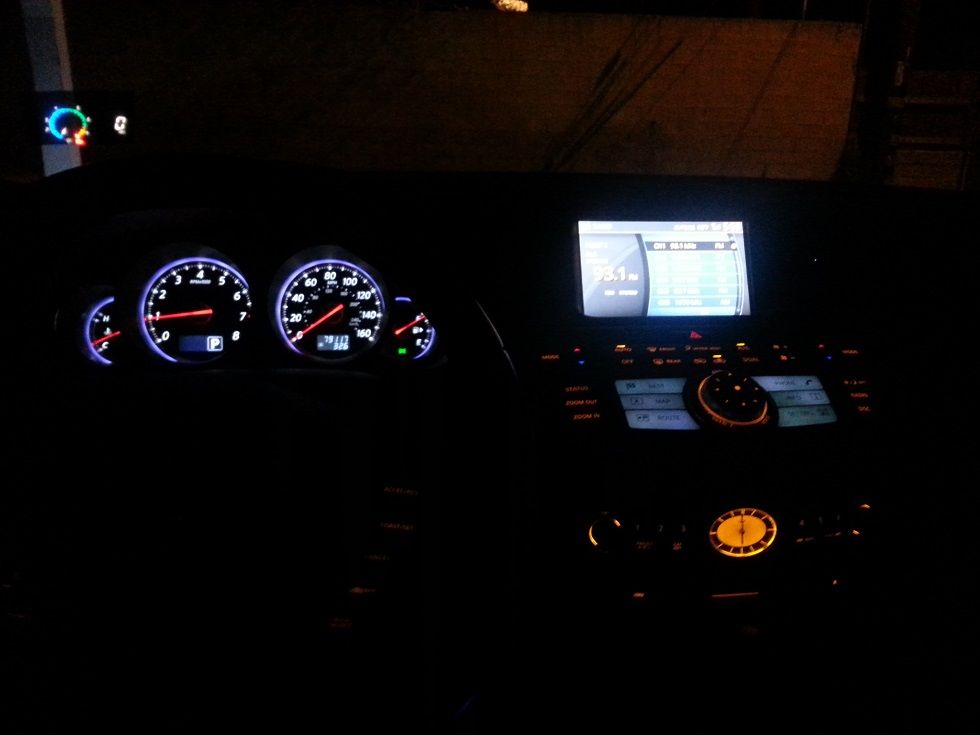
Upper left is the HUD display. Can see it perfectly fine even in bright sunlight. Auto dims at night. Has over speed, over rev, warnings (turns red when limit that you set is exceeded). Also will switch to a warning if battery voltage falls too low or coolant temp too high.

-
M35xTO
- Posts: 26
- Joined: Tue Dec 03, 2013 6:38 pm
- Car: M35x fully loaded + aero
- Location: Toronto, ON, Canada
Re: OBD2-based HUD that is *optically collimated*?
Thanks. I completely agree re the ugly look, which is why I was looking into something more OEM-like.msvara wrote:LOL props to the creative ideas but REALLY! I wouldn't want that garbage using cardboard as support in my nice luxurious car. That is something I associate to the ghetto cars with the home depot skirts. Even if you put the effort into making it look presentable it's just way too much effort for the return IMO.
Good point re the GM products! I will look into it. Even if the system, as a whole, will not work, I'm sure the optics could be salvaged to use with an old smartphone or something. I haven't gotten a chance to see how they are made exactly, but I'm hoping it would be easy to retrofit my own screen into the system, if they don't use a standard input (i.e. OBD2)The00Dustin wrote:My 98 Park Avenue Ultra had a HUD, and it was great. IIRC, it was just digital speed, turn signal indicators, and an indicator to tell you to check the dash if anything else was up (any kind of warning light on the dash, that indicator came up). I'd say it's a very good feature to have, and I'd say LDW is a very good feature to have. I'd say that the vocal majority will always think both features are annoying / waste of money, but personally, I think if one can put their pride aside and take advantage of such features (and maybe learn half the driving laws), our roads could be a lot safer even with higher speed limits. Nonetheless, for purposes of remaining on topic, I'd recommend looking into OEM GM HUDs. I don't know where the data comes from, but they have been around for a long time, so there are probably plenty in junk yards. Also, keep in mind that they are probably mnufactured by a third party with a patent (likely BMW HUDs are as well), so it may be possible to get more information from other sources. Finally, FYI, the GM HUD came up through a small slot in the top of the dash to reflect on the windshield and there was a mirror with an electronic adjustment inside the dash to move the HUD up/down (more to make it visible for people of different heights than to put it where you want it). The windshield specifically indicated it was made for a HUD, though, so I don't know how you deal with that in an M.
Larz, and DeanM45: Thanks for the replies; I've seen many people using the after market HUDs you have mentioned. However, I have decided that I will not use them myself due to the focal point difference between the projected (or rather, reflected) image, which would require my eyes to refocus. The cool thing about OEM HUD displays is that they are optically collimated to be at optical infinity. Thus, when you look through the windshield, it will not look as if the numbers are projected onto the windshield, but rather onto the background itself. If you haven't seen one in action, I suggest going to a dealership to take a look; it really is quite cool, and you will realize how much better they are than the typical after market setup.
-
Larz
- Moderator
- Posts: 2894
- Joined: Thu Feb 21, 2013 8:55 pm
- Car: 2019 Q70-L RWD
- Location: Ft Lauderdale, Florida
- Contact:
Re: OBD2-based HUD that is *optically collimated*?
Well stated! My Escalade had a true HUD and also a night vision cam. The difference between looking at a reflected image on the inside of the glass Vs the info just seemingly 'floating' in front of you is night Vs day. However, since Infiniti can't be bothered to add an option like this or a panoramic roof (that have been on other cars for at least a decade), we have no choice but a reflected inmage. My love for my M supercedes Infiniti's lack of these and other options (but I reserve the right to whine, LOL).
-
superdave8491
- Posts: 1
- Joined: Sun Dec 29, 2013 4:28 am
- Car: 2010 challenger srt8
Re: OBD2-based HUD that is *optically collimated*?
Hi, I have purchased one of these obd systems but I cant get it to connect to my car. Any tips or suggestions from anyone who has previously had success installing them?