When I bought by G37 a month or two ago, they didn't have one with the options I wanted locally and had to ship it in from Chicago. I've noticed that on the Navigation System, it's preloaded with locations for shopping, restaurants, etc. but the closest ones are in Kansas. As I live in Nebraska, that's not very helpful. Is there a way to download more local locations and add those to the system?
Thanks in advance.

Navigation System Issue
-
scjconsulting

- Posts: 142
- Joined: Mon Feb 27, 2006 8:08 am
- Car: 2009 G37x
- Location: Roseville, MN
Re: Navigation System Issue
It's set on the wrong area of the country. Go to the first screen of Navagation set-up and move the pointer to your area of the country.
Also, when you want to use the navagation from your area to another area, move the navagation pointer to that area before you put in the address you want to go to.
Before navagation came on a 1 disk DVD or as it is now, loaded on a hard drive or memory chip, it came on about 10 CDs. You had to load in a different disk when you wanted to navigate to another part of the country. You still have to tell the navagation system which area to look in or it would give you too many "West Main Street" to choose from.

Also, when you want to use the navagation from your area to another area, move the navagation pointer to that area before you put in the address you want to go to.
Before navagation came on a 1 disk DVD or as it is now, loaded on a hard drive or memory chip, it came on about 10 CDs. You had to load in a different disk when you wanted to navigate to another part of the country. You still have to tell the navagation system which area to look in or it would give you too many "West Main Street" to choose from.
-
Tim30250

- Posts: 259
- Joined: Sun Dec 20, 2009 4:43 am
- Car: 2009 G37 Journey Premium/Nav/Cargo Net!!! 2002 330Ci - Supercharged
- Location: San Antonio, TX
Re: Navigation System Issue
That makes sense, but I still find it strange that you have to select your area of the country on a map since the nav kinda knows exactly where you are at all times. You would think it would just automatically assume that you wanted to find a restaurant near your current location, not in some other state. It should be able to just select the region based on your actual location unless you tell it otherwise.
-
SteveTheTech

- Posts: 3751
- Joined: Sat Aug 16, 2008 3:20 pm
- Car: 15 Nissan Sentra SR
12 Infiniti G37x Coupe
-Formerly-
05 Mazda 6 L3 Sport
95 Infiniti J30
94 Nissan D22 - Location: Chantilly, Va
Re: Navigation System Issue
Try going into the DEST menu and selecting CHANGE REGION (with the emblem of North America) select the correct region the car is primarily driven in.
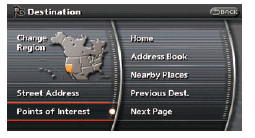
This is the setting for the POIs and search features.
http://www.infinitiusa.com/pdf/techpubs ... T-Navi.pdf
Good Luck.
This is the setting for the POIs and search features.
http://www.infinitiusa.com/pdf/techpubs ... T-Navi.pdf
Good Luck.