
Let's talk about smart home thermostats

A General Discussion forum for cars and other topics, and a great place to introduce yourself if you are new to NICO!
User avatar
PapaSmurf2k3
Site Admin
Posts: 18997
Joined: Thu Nov 21, 2002 3:20 pm
Car: 2017 Corvette, 2018 Focus ST, 1993 240sx truck KA Turbo.
Location: Merrimack, NH

Post

So it sucks when you come home from a vacation, your flights get delayed, and you don't get home until like 2am, and your house is still 87 degrees. All you want is some effin sleep, but that ain't happening in this heat.

Enter the smart thermostat. You can get the house cooling while you're still sitting on the tarmac, waiting for that jabroni running the jetway to pull it up to the plane, and the old lady trying to back track 6 rows so she can get her 3 carry on bags that are all bigger than her.

I currently have a no frills (yet reliable) Honeywell unit. This exact unit actually:
Image
Its powered via 2 AA batteries. From what I can tell, I don't have a common wire going to the back of mine, so I'll have to do some kind of hack when I upgrade.

I haven't viewed every thermostat out there, but I do like Honeywell products. They are a solid company that makes everything from turbos (yes, the ones in your car), to fans, toasters, and other household goods. They seem to have wifi thermostats that range from something like this:
Image
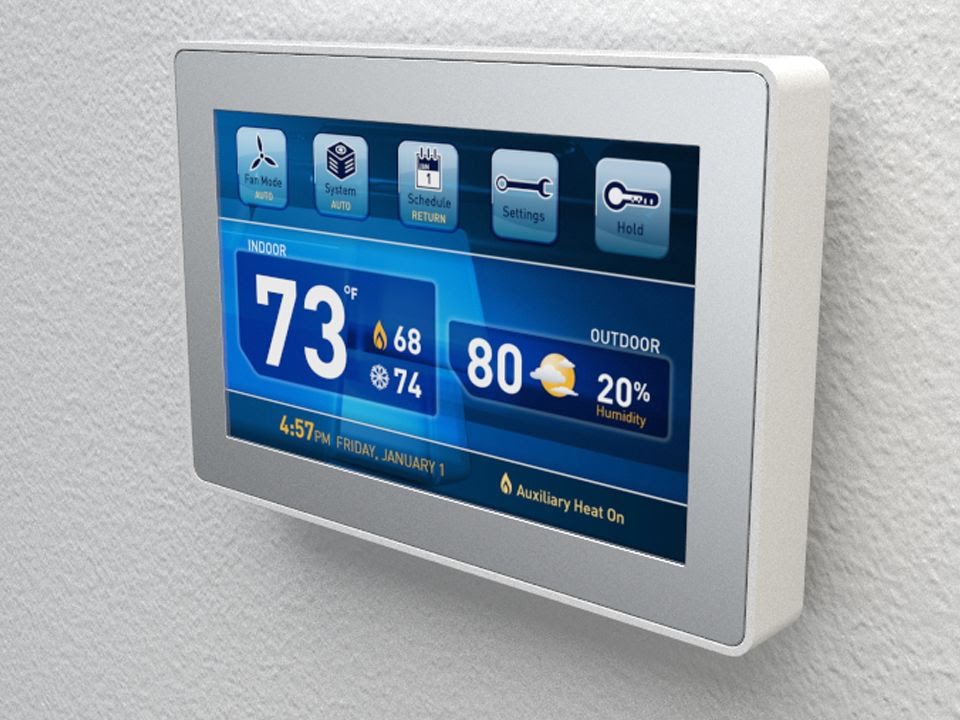
to flat out command centers like this:
Image

I don't really feel the need to spend an extra hundred dollars to have a flashy layout, but if anyone out there has any experience with these, I'd like to hear it!

User avatar
Bubba1
Moderator
Posts: 16082
Joined: Wed Oct 30, 2002 1:42 pm
Car: 2003 Nissan 350z
2024 Honda HR-V
2008 Toyota Corolla S
2001 Toyota Avalon XLS

Post

I use Honeywell thermostats too, but just for heat. I have a very old house so I have room a/c's. I have the next step up Honeywell one then the first one pictured, it t has multiple programmable settings throughout the day/night/week. Far from fancy. As far as worrying about taking so long for the house to cool down if you're late coming home from a vacation or unusual event that requires a deviation. Ask yourself how often you actually do that and how long it actually takes to cool down the room you want. If you live in a modern house, I'm guessing you're talking minutes for it cool down, not hours. I also suspect its probably not often enough or slow enough to warrant a more expensive complex thermostat you (and hackers) can futz with via cell phone. If you're looking to add efficiency on a budget, install a ceiling fan or two.

User avatar
PapaSmurf2k3
Site Admin
Posts: 18997
Joined: Thu Nov 21, 2002 3:20 pm
Car: 2017 Corvette, 2018 Focus ST, 1993 240sx truck KA Turbo.
Location: Merrimack, NH

Post

My house is loaded with ceiling fans and box fans, but its really not enough. Everything in the house gets heat soaked, so it generally takes it well over an hour to drop the temp to an acceptable level. I do this often enough to make me want to have this feature. Getting a severe lack of sleep for just one night seems to mess up my whole damn week now.
I can't understand why a hacker would f*** with someone's thermostat. It doesn't seem very lucrative... you'd think they have something better to do.

User avatar
Bubba1
Moderator
Posts: 16082
Joined: Wed Oct 30, 2002 1:42 pm
Car: 2003 Nissan 350z
2024 Honda HR-V
2008 Toyota Corolla S
2001 Toyota Avalon XLS

Post

I must have a devious mind. I would never do it but I see it as very effective if someone who wants to get under your skin. I suppose we have different perspectives about a/c. I grew up without it, and didn't have home or car a/c until after college. So if I get home and have to wait an hour for the home to reach ideal temp is not a big deal to me. I also don't normally go to sleep moments after arriving home. so if I turn on the a/c upon arrival home, it'll be cool enough for me by the time I hit the sheets. But that's just me, if you want that comfort more quickly, I say go for it.

User avatar
PapaSmurf2k3
Site Admin
Posts: 18997
Joined: Thu Nov 21, 2002 3:20 pm
Car: 2017 Corvette, 2018 Focus ST, 1993 240sx truck KA Turbo.
Location: Merrimack, NH

Post

Yeah I never had AC growing up either, but I also didn't live in Mississippi :p

User avatar
darylzero
Posts: 1267
Joined: Fri Aug 28, 2009 5:28 am
Car: Nissan Rogue 2009 SL AWD Premium Pkg.

Post

PapaSmurf2k3 wrote: I can't understand why a hacker would f*** with someone's thermostat. It doesn't seem very lucrative... you'd think they have something better to do.
Ye who ask shall receive. https://www.techdirt.com/articles/20160 ... ware.shtml


Image

User avatar
MinisterofDOOM
Moderator
Posts: 30928
Joined: Wed May 19, 2004 5:51 pm
Car: 1962 Corvair Monza
1961 Corvair Lakewood
1974 Unimog 404
1997 Pathfinder XE
2005 Lincoln LS8
Former:
1995 Q45t
1993 Maxima GXE
1995 Ranger XL 2.3
1984 Coupe DeVille
Location: The middle of nowhere.

Post

I'm a big honeywell fan, myself (could be my alarm industry background).

But I actually have a 2nd-gen Nest in my house. I wanted something configurable, that would probably be supported for a while, with a decent cloud infrastructure (since I didn't have the resources for local hosting at the time) and with learning capability but also manual scheduling.

The Nest has ups and downs.

Ups:
+It's been very dependable
+It's straightforward to use as a thermostat (e.g. non-programmable modes)
+Online control (via web or smartphone interface) works well and is simple but fairly robust.
+Nest goes WAY out of their way to make this thing easy to install, with very well-labelled diagrams, instructions, and even hardware, with a not-bad screwdriver included in the box. There's even a bubble level on the mounting/wiring plate--something I appreciated even though I have other levels because the Nest's mounting plate is round. This thing was a genuine no brainer. My grandma could install it in 15 minutes with only what's in the box.
+No touchscreen (also a downside, but I hate commercial-grade resistive touchscreens and feel like they're just waiting to fail in ~3-5 years).
+The auto-away features work pretty well (especially combined with the location functions of the smartphone application). They can also be paired with other nest-compatible devices with proximity detection for improved accuracy.
+Learning seems more or less intelligent. It doesn't turn every input into a programming change, but watches for trends. However, it also doesn't take days and days to learn when changes are consistent. It adapts well without being overly eager.
+Day-by-day (not just weekend vs weekday like many programmables) scheduling is possible through a simple interface...just not on the unit itself. It's a little TOO user-friendly but not completely cludgy.
+IT does support combined heat/cool mode, which is very nice here in early spring and late fall, when one day (Hell, one hour) I'll want heat and the next A/C. IT doesn't fight itself alot, but does offer configurable thresholds for both heat and cool in case that does become a problem.

Downs:
-There's no quick way to turn the thermostat OFF. This is something I do a lot in spring and fall here where temps are consistently moderate. You have to click through menu options and toggle to OFF from whichever mode (heat/cool/both) you are operating in. Then do the reverse to turn it back on. A "press and hold for off/on" feature would fix this, but I doubt it'll happen.
-The scheduling interface is a bit overly simple and is a little more time-consuming to use than I'd like--especially on a smartphone (vs a mouse via the web interface).
-Very rarely (twice in the year-plus I've had mine) it'll just lose sight of its wifi connection despite the SSID still being live. I've had to reboot it once to fix that, and the second time it just found it again a few minutes later. It seems to recover from actual network loss/outage just fine, so I'm not sure where this problem stems from. Maybe 2.4Ghz interference of channel crowding or something. Not frequent enough to piss me off, but it is certainly odd.
-It's pricey, though not THAT bad by smart thermostat standards.
-Sometimes the proximity wake glitches out and doesn't work at all--fortunately, you can just click the face to wake the device. But I can't find any consistence in situations where it won't proxy-wake vs times when it works correctly.
-Privacy and security. Not only are you giving Nest (google) another peek into your life, but there's really NO security on the cloud integration side of things. Someone bored script kiddie could easily make life a bit less pleasant for Nest Owners if he just decided it was worth his time. I've actually strongly considered spoofing the DNS on the local side to point my nest at my own network to circumvent both these problems, but obviously not everyone is going to want (or be able) to take that route.

User avatar
frapjap
Posts: 13175
Joined: Thu Jul 01, 2004 2:46 pm
Car: '99 Pontiac Firebird Trans Am
'07 Subaru Legacy
Location: South Coast Massachusetts

Post

Get one of those cheapie programmable thermostats. We have one for heat, I'm sure they make one for A/C, too.

Even if you're not there, at least having a constant few hours of the a/c on before you get home or after you leave would do the trick.

User avatar
elwesso
Posts: 30810
Joined: Sun Feb 23, 2003 4:52 pm
Car: 94 Infiniti Q45t 5 spd
2007 BMW M Coupe
2007 Infiniti G35 S 6MT
Location: Indiana
Contact:

Post

I've heard really good things about the NEST. One thing to consider is that I'm not sure all "off the shelf" programmable thermostats support heat pumps especially heat pumps with aux heat. James, not sure if you have a heat pump or a gas furnace (heat pump would be very possible being down south), but something to consider. I believe the Nest supports gas furnace w/AC, or a 2 stage heat pump (Y1, Y2, and O outputs) w/ aux. heat.

I believe the Nest also has some pretty cool functions like being able to leave the fan on for a certain time period or indefinitely (while still turning the AC/Heat on to maintain set point), which you can also do remotely...

Maybe it's just me getting older, but I tend to sacrifice advanced functions for something that works reliably and is easy to use, especially stuff around the house. Meaning, I'm sure there's other stat's out there that have more functions/features, but from what I understand it's hard to beat the Nest's reliability and overall ease of use..

Alternatively, my company makes thermostats as well (they're mainly designed for our units and their features, but would work with anything).

http://www.waterfurnace.com/literature/ ... 1600MW.pdf

I could probably hook you up with one of those if you were interested...

User avatar
centralcoaster33
Posts: 2634
Joined: Tue Apr 05, 2005 10:41 am
Car: 1997 Nissan 240SX #5
Location: Central Coast, CA

Post

Image
Image

I am told this does not really happen... yet. :biggrin:

User avatar
PapaSmurf2k3
Site Admin
Posts: 18997
Joined: Thu Nov 21, 2002 3:20 pm
Car: 2017 Corvette, 2018 Focus ST, 1993 240sx truck KA Turbo.
Location: Merrimack, NH

Post

Damn, I'll be pissed if it does.
Wes - it doesn't look like any of the ones you guys make are what I'm looking for (web/phone connectivity)... unless the catalog is poorly written.

User avatar
MinisterofDOOM
Moderator
Posts: 30928
Joined: Wed May 19, 2004 5:51 pm
Car: 1962 Corvair Monza
1961 Corvair Lakewood
1974 Unimog 404
1997 Pathfinder XE
2005 Lincoln LS8
Former:
1995 Q45t
1993 Maxima GXE
1995 Ranger XL 2.3
1984 Coupe DeVille
Location: The middle of nowhere.

Post

With Nest, I'm a lot more worried about the company not existing next year than I am about ads showing up on my display. VERY poorly-managed Google subsidiary that has a little too much free reign.

User avatar
PapaSmurf2k3
Site Admin
Posts: 18997
Joined: Thu Nov 21, 2002 3:20 pm
Car: 2017 Corvette, 2018 Focus ST, 1993 240sx truck KA Turbo.
Location: Merrimack, NH

Post

MinisterofDOOM wrote:With Nest, I'm a lot more worried about the company not existing next year than I am about ads showing up on my display. VERY poorly-managed Google subsidiary that has a little too much free reign.
I agree. I like being under the Honeywell umbrella at times.

...I wonder if they actually make umbrellas too.

User avatar
elwesso
Posts: 30810
Joined: Sun Feb 23, 2003 4:52 pm
Car: 94 Infiniti Q45t 5 spd
2007 BMW M Coupe
2007 Infiniti G35 S 6MT
Location: Indiana
Contact:

Post

PapaSmurf2k3 wrote:Damn, I'll be pissed if it does.
Wes - it doesn't look like any of the ones you guys make are what I'm looking for (web/phone connectivity)... unless the catalog is poorly written.
They probably don't, was just a shameless plug... :gapteeth:

User avatar
PapaSmurf2k3
Site Admin
Posts: 18997
Joined: Thu Nov 21, 2002 3:20 pm
Car: 2017 Corvette, 2018 Focus ST, 1993 240sx truck KA Turbo.
Location: Merrimack, NH

Post

Well, I went with the Honeywell. I think it was like 65 bucks shipped or something. Not bad.
Pulled the old one off and was prepared to do the ole fan jumper wire trick on the unit, but found a common wire in my harness... it was just cut way back. So I cut the rest of the wires back and pulled them through the wall a bit. Wired it up to the new back plate and BAM, nothing.
So I get the ladder and head up to the attic where its cramped and hot and stupid. Pulled the panel off the unit and found the common wire not hooked up to anything. Took a SWAG at what to hook it to (there's no board or anything, just a s*** of wires and wire nuts) and its got power now. Took a while to tarzan my way back down stairs and set the thing up (date, heating/cooling system, etc).
After that I tried to register it on the wifi. It said you only have a 10 minute window after you hook it up to set the wifi up, and that I should pull the unit, wait 5-60 seconds, and re-install (and it would re-initialize and you could set it up). None of that is working :(
Guess I'll deal with it tomorrow. If not, I just paid a lot of money for upgrading to something I don't have to change the batteries on.

User avatar
AZ89two4Tsx
Posts: 13634
Joined: Sat Mar 08, 2008 8:02 am

Post

We have a Honeywell in our place - nice unit. It isn't too fancy but has multiple programs on it you can run for temps during various periods of the day.

Another thing to check out would be your local utility company. My roommate works for our local power company and they have a deal where they install a Wifi enabled unit that you can control from your phone. Basically a less expensive version of NEST. No catch, it's free - presumably to save them on electricity generation. So yeah, that would be something to check out. It's available to everyone here I believe, definitely not just employees. Until then (for us) our Honeywell unit for about $30 works for us...

User avatar
PapaSmurf2k3
Site Admin
Posts: 18997
Joined: Thu Nov 21, 2002 3:20 pm
Car: 2017 Corvette, 2018 Focus ST, 1993 240sx truck KA Turbo.
Location: Merrimack, NH

Post

That would be awesome.
I got mine working last night. I just unplugged it for about an hour and a half (with the battery removed) and got it to go through setup again.

User avatar
prichy
Posts: 1
Joined: Tue May 09, 2017 5:00 am
Location: Mississauga
Contact:

Post

This article helps me with the HVAC. Thanks for sharing these amazing tips with us.

wa-chiss
Posts: 2569
Joined: Mon Feb 20, 2006 10:23 pm
Car: 1990 Nissan S13 H/C KA24E
2005 Toyota Sequoia
1976 Honda CB750F Super Sport
Location: San Angelo, TX

Post

My sole experience with "Smart Thermostats" is based off the Nest. I signed up for a 2 year plan with the electric company and received the Nest free of charge.

It was easy to hook up (adequate instructions I could understand and follow)
Set-up was easy to WiFi and initial system set-up was quick
The App is easy to use as well.
It learned my "Habits" with temperature settings so I eventually had to go to the thermostat less and less (or use the app less and less)
I LOVE being able to set it to "Away" mode when away and adjusting the temperature to desired temp before I arrive.

All-in all, I'm very happy with the performance and durability (I accidentally knocked it off the wall and the glass didn't break) of the unit.

User avatar
SteveTheTech
Posts: 3751
Joined: Sat Aug 16, 2008 3:20 pm
Car: 15 Nissan Sentra SR
12 Infiniti G37x Coupe
-Formerly-
05 Mazda 6 L3 Sport
95 Infiniti J30
94 Nissan D22
Location: Chantilly, Va

Post

MinisterofDOOM wrote:I'm a big honeywell fan, myself (could be my alarm industry background).

But I actually have a 2nd-gen Nest in my house. I wanted something configurable, that would probably be supported for a while, with a decent cloud infrastructure (since I didn't have the resources for local hosting at the time) and with learning capability but also manual scheduling.

The Nest has ups and downs.
It's funny that several years later we still use very similar logic. :cheers:

I bought two 2nd gen Nests prior to moving into my end unit townhouse. Other than the well stated minor complaints about scheduling and turning it off, they have been very reliable,efficient, and (reasonably) inexpensive. They were a decent way to ease my wife into the concept of smart home tech.

I very much agree with some of the security concerns. I would like to keep my entire smart home stored locally, but not having a pro level of knowledge I fear I would ensure it ended 3x more expensive and more risky than if I just gave in to Google.

I am now on the verge of taking outdoor cameras too far. It started simply enough with a Ring.


Return to “General Chat”