
I want to post a picture of my car but im dumb!! someone school me
-
slidestyle69

- Posts: 500
- Joined: Fri Mar 27, 2009 6:11 am
- Car: 92 s13
- Location: Alabama
I want to post a picture of my car but im dumb!! someone school me
someone please tell me how to post a picture?

Re: I want to post a picture of my car but im d ... (slidestyle69)
Make an account on photobucket.com, upload the pics, post them here using the "IMG Code".
-
mattblancarte
- Posts: 1978
- Joined: Sat Jun 21, 2008 4:14 pm
- Car: 2005 BMW M3 Comp. Coupe
Re: I want to post a picture of my car but im d ... (DirtyGhettoKids)
I prefer Flickr, but yes, to have an image displayed you'll need to upload it to the internet. Once you have an account with Flickr or Photobucket or whatever, upload your photos.
The [IMG] code that DGK is referring to is the little yellow icon with a mountain that is above the post field that you type in to reply here on the forum.
What you'll want to put in the middle of the [IMG] code is the url source of the image. This can be found by right clicking on an image and hitting the "Copy Image Address" button.
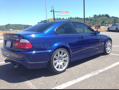
For example, this is the image url for the picture below:
http://farm4.static.flickr.com...o.jpg
Should turn out like this:
Make sense?
The [IMG] code that DGK is referring to is the little yellow icon with a mountain that is above the post field that you type in to reply here on the forum.
What you'll want to put in the middle of the [IMG] code is the url source of the image. This can be found by right clicking on an image and hitting the "Copy Image Address" button.
For example, this is the image url for the picture below:
http://farm4.static.flickr.com...o.jpg
Should turn out like this:
Make sense?
-
slidestyle69
- Posts: 500
- Joined: Fri Mar 27, 2009 6:11 am
- Car: 92 s13
- Location: Alabama
Re: I want to post a picture of my car but im d ... (mattblancarte)
sounds simple my friend, i jus made a photobucket acct. and forwarded the pics from my pda to the acct. My post with a lil history of my 240 will be up in a few....hopefully