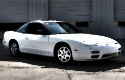
What do you guys think?

First time using HDR.
-
matt_240sx
- Posts: 336
- Joined: Mon Nov 24, 2008 1:50 pm
- Car: 1993 240sx Hatch
- Location: Clarksville, IN
- Contact:
-
scotty-2-forty
- Posts: 1888
- Joined: Wed Sep 04, 2002 6:10 am
- Car: 1996 Nissan 240SX SE KA24DET
- Contact:
Re: First time using HDR. (matt_240sx)
Beautiful picture!
-
nevertheless

- Posts: 1378
- Joined: Tue Jan 22, 2008 11:12 am
- Car: 1993 240sx hatch
1995 Nissan D21 - Location: Omaha, Nebraska
- Contact:
-
matt_240sx
- Posts: 336
- Joined: Mon Nov 24, 2008 1:50 pm
- Car: 1993 240sx Hatch
- Location: Clarksville, IN
- Contact:
Re: (nevertheless)
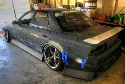
yeah. it wasnt but the hdr just makes it seem that its dirty lol
-
SILVIAJayS
- Posts: 178
- Joined: Sun Jul 08, 2007 1:37 pm
- Car: 1996 Nissan 240SX SE
Re: (matt_240sx)
Yeah man, too many shadows on the car, makes it look blotchy and you can't see the lines. The trees and the clouds look pretty cool though, see if you can find a spot nearby where the car would get more light on it...matt_240sx wrote:yeah. it wasnt but the hdr just makes it seem that its dirty lol
-
matt_240sx
- Posts: 336
- Joined: Mon Nov 24, 2008 1:50 pm
- Car: 1993 240sx Hatch
- Location: Clarksville, IN
- Contact:
Re: (SILVIAJayS)
yeah i kinda thought that it would turn out a little weird cause it was in the shadow. but next time i will find a better spot!SILVIAJayS wrote:
Yeah man, too many shadows on the car, makes it look blotchy and you can't see the lines. The trees and the clouds look pretty cool though, see if you can find a spot nearby where the car would get more light on it...
Re: First time using HDR. (matt_240sx)
Is your car Misty Metallic Blue?
-
matt_240sx
- Posts: 336
- Joined: Mon Nov 24, 2008 1:50 pm
- Car: 1993 240sx Hatch
- Location: Clarksville, IN
- Contact:
Re: First time using HDR. (K3Fallout)
no. its white. here is the original picture:K3Fallout wrote:Is your car Misty Metallic Blue?
Just try using minimal processing to bring out the trees a little bit. That's all. Don't rely on the HDR to make your picture "cool". HDR should (well, it shouldn't, really) be used to touch the picture up and give it a little bit of spice.
Used in minimal quantities, HDR can definitely make a good picture. But really, it's up to the photographer.
Used in minimal quantities, HDR can definitely make a good picture. But really, it's up to the photographer.

Re: (S13Teddy)
The over processed side of "HDR" is a completely different sub-categorythin its HDR Tone-mapped or whatever,
but i agree with Teddy. try toning it down a bit.looks over processed
what software are you using?
but i agree with Teddy. try toning it down a bit.looks over processed
what software are you using?

Re: (S13Teddy)
Try enhancing your pictures, not changing them. Definitely a good start though.
-
matt_240sx
- Posts: 336
- Joined: Mon Nov 24, 2008 1:50 pm
- Car: 1993 240sx Hatch
- Location: Clarksville, IN
- Contact:
Re: (S13Teddy)
yeah. But it's not really a trial version. It just puts a watermark on the photos.S13Teddy wrote:I'm pretty sure he's using the trial version of Photomatix.
But thanks for the advice. Now that I look at it, it does look like I did process it a little too far.
Re: (matt_240sx)
That's a registered version and it still adds the watermark? Sounds like you're getting jipped.matt_240sx wrote:
yeah. But it's not really a trial version. It just puts a watermark on the photos.
But thanks for the advice. Now that I look at it, it does look like I did process it a little too far.
-
matt_240sx
- Posts: 336
- Joined: Mon Nov 24, 2008 1:50 pm
- Car: 1993 240sx Hatch
- Location: Clarksville, IN
- Contact:
Re: (S13Teddy)
no! What I mean is it's a trail but you can do the same things on it as a full version but it just has a watermark on it. I didn't pay for it.S13Teddy wrote:
That's a registered version and it still adds the watermark? Sounds like you're getting jipped.
-
OM3GA

- Posts: 3041
- Joined: Fri Apr 14, 2006 11:41 pm
- Car: A Sexy Mobile, 1993 Nissan 240sx 180sx Hatcher
Re: (matt_240sx)
lol

Too much processing. Did you work off of one exposure? Because you really need at least 3 exposures for HDR to really work well. Composition wise, the foliage clutters the crap out of your photo and HDR just makes it worse by adding emphasis to it.
Some examples, not my car but its HDR:
http://lh5.ggpht.com/_QhN3XULY...R.jpg
Some examples, not my car but its HDR:
http://lh5.ggpht.com/_QhN3XULY...R.jpg
-
matt_240sx
- Posts: 336
- Joined: Mon Nov 24, 2008 1:50 pm
- Car: 1993 240sx Hatch
- Location: Clarksville, IN
- Contact:
Re: (Kyuusei)
I used at least 3 or 4 exposures on it.
-
Koshin

- Posts: 14088
- Joined: Wed Feb 13, 2008 4:43 pm
- Car: JP'd out Y32 Nissan Gloria GTU
750 hp '87 Buick Grand National
'63 Chevy Impala SS 327/4 speed - Location: ...in your garage stealing your wheels
- Contact:
Re: (matt_240sx)
what program are you using. This whole HDR thing keeps coming up more often, I need to learn this process.
A short explaination would be awesome. Thanks gents
A short explaination would be awesome. Thanks gents
-
matt_240sx
- Posts: 336
- Joined: Mon Nov 24, 2008 1:50 pm
- Car: 1993 240sx Hatch
- Location: Clarksville, IN
- Contact:
Re: (Koshin)
im using photomatrix pro 3. but its really easy cause the program basically does the hard stuff for you. but basically all you do is combine a picture that has had different exposures on it, then you just the picture to the way you want it. there is a tutorial on the program.Koshin wrote:what program are you using. This whole HDR thing keeps coming up more often, I need to learn this process.
A short explaination would be awesome. Thanks gents
here is the link to download photomatrix.
http://www.hdrsoft.com/download.html#pmp