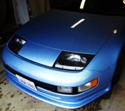
Bought my Z today! Thought I would say Hi!

The Nissan 300ZX (Z32) general community discussion forum
Trimble Epic
Posts: 155
Joined: Sun Mar 10, 2013 5:58 pm
Car: White/Ivory 93 300zx NA 2+2 (RIP)

Post

Hi all!

UPDATE: She's MINE! Muuwahaha!!!! Photos below...

OLDER: I'm about to acquire my first Z. My father had one when I was a kid (84 anniversary edition turbo), but he got hit in it, and the insurance "totalled" it out. Shame. I loved his car. Tomorrow, I bring a Z back into the family!

It has a few minor issues, but I think I've done most of my homework, and made SURE that it comes with a receipt for the timing belt service within the last 25k miles :) I trust that is a good thing.

Anyway, the two issues I must deal with immediately are 1) the window tint on the rear window obscures vision, and MUST come off immediately. I think it can be steamed off? and 2) the Driver's seat is tRaShed. I read somewhere on here that I can get replacement skins? Can someone point me toward some very inexpensive skins for a 93 2+2? I really only need the drivers seat, but I would take both front seats to keep a match. I'll re-upgrade to something Nice later. Edit: How are these?

Anyway, Hi!

Trimble
Last edited by Trimble Epic on Mon Mar 11, 2013 5:29 pm, edited 2 times in total.


BlackWidowZ
Posts: 310
Joined: Fri Jan 04, 2013 8:35 am
Car: Black 93 300zx 2+2

Post

welcome. the seat covers like these are replacements not really a cover its more like what you need to re do the seats.

seat covers ive bought from them before.
http://stores.ebay.com/exotikleather

window tint you can use a fabric steamer but you could also use a spray bottle with water in it spray the window and use a hair dryer. or a heat gun.

Trimble Epic
Posts: 155
Joined: Sun Mar 10, 2013 5:58 pm
Car: White/Ivory 93 300zx NA 2+2 (RIP)

Post

So, what you're saying is that they are Skins, not seat covers?

I hope I'm using the word skins right... I don't want to just Cover the damage to the drivers seat, I want to remove the old leather and foam from the seat frame and replace them. The existing seat is so bad that the foam itself needs to be replaced. I'll post a photo soon after I get the car home (today?).

So, are the interior-innovations what I'm looking for, or are those just "covers" too?

BlackWidowZ
Posts: 310
Joined: Fri Jan 04, 2013 8:35 am
Car: Black 93 300zx 2+2

Post

they are skins

Trimble Epic
Posts: 155
Joined: Sun Mar 10, 2013 5:58 pm
Car: White/Ivory 93 300zx NA 2+2 (RIP)

Post

Yay! Ok, I assume your short response means I was using the word skins right, and this is what I would need if I want to remove all the old leather and foam and replace with new leather and foam on the existing seat frame... (I just want to be able to sit in the car right away, I will replace with real leather later, if I need to)

So, does anyone have experience installing skins like these? what is involved? are the new skins STITCHED together over the frame, or laced? or something like that? I'm expecting its not just a "slide 'em on" job (at least, I hope not), and I'm willing to do whatever work it takes to get them on right.

BlackWidowZ
Posts: 310
Joined: Fri Jan 04, 2013 8:35 am
Car: Black 93 300zx 2+2

Post

its not a slide em on job. Its a reupholster job. You have to remove the old upholstery. They are hooked to the seat structure. Lots of people have done them so somone should be able to give you more info. I don't know if there is a write up on this procedure.

Trimble Epic
Posts: 155
Joined: Sun Mar 10, 2013 5:58 pm
Car: White/Ivory 93 300zx NA 2+2 (RIP)

Post

Looks like this YT channel has useful information... I saw someone mentioned a "hog ring" on these forums, so I'm guessing that's the method of attachment for the seats... However, now I'm wondering if the above link includes the foam... I will likely have to replace the foam for this driver's seat.. it's really bad.

I'll post later, I'm leaving now to go get the car ;)

Trimble

z32loverboy
Posts: 516
Joined: Tue Mar 22, 2011 6:05 pm
Car: 1990 300zx CRP N/A 5 Speed (wreaked, now a shell) SOLD

1993 Slicktop CRP N/A 5 Speed w/ '90 built N/A motor and interior

1958 Ford f-100 straight-body (Grandaddies truck, resto-project)
Location: Nashville, TN

Post

Welcome! post pics of her when you get 'er!

User avatar
300ZXttZMAN
Posts: 6800
Joined: Mon Nov 22, 2010 4:07 pm
Car: 1990 Nissan 300ZX TT 5spd pearl white

DD: 2008 Nissan Frontier NISMO pkg 4x4 Crew Cab
Location: Sulphur, LA 70665
Contact:

Post

Welcome to NICO!

We wish you a smooth transaction.

Trimble Epic
Posts: 155
Joined: Sun Mar 10, 2013 5:58 pm
Car: White/Ivory 93 300zx NA 2+2 (RIP)

Post

Well, she's mine! White Z32 1993 NA 2+2
z32loverboy wrote:Welcome! post pics of her when you get 'er!
I'll take some photos tomorrow!

Here's the photos from the craig's listing:
Image
Image
Image
Image

Some issues I need to resolve:

1) Driver's seat is shredded. This is the worst issue on the car.. however, honestly, I can wait a few weeks to fix this.. more important is #2:
2) rear window tinting gone bad: it's blurry and I can't see anything out the back window except blobs. I need to remove that film asap. I understand steam will work, and I'm very patient (I habitually remove the labels from food my wife brings home while I eat. sometimes over the course of an hour :P)
3) Tach isn't working. But, it's an automatic. So I don't really need to see the tach yet.
4) Seller reports that timing is slightly out of spec... a tune-up gone awry, he explained. I found the article on adjusting the timing, so that should be easy.
5) He pulled out his own 4 channel amp. So, the stereo head unit isn't connected to the speakers. Time to regress to my childhood.. I was a car stereo nut in high school ;)
99) I suspect my wheels may be on backwards... I suspect someone will come out of the woodwork to tell me if they are...

I have all the service receipts! including the timing belt service at 170,000. She's at 195000 now, so I can relax a little on the timing belt.

I need to get my reg and title filed tomorrow morning, then I can go rock out!

User avatar
H1tman
Posts: 136
Joined: Wed Mar 14, 2012 3:38 pm
Car: '90 300zx 2+2 Azure Blue
Location: Temecula, CA

Post

Welcome! And yes you should switch all your wheels to the opposite side.

Trimble Epic
Posts: 155
Joined: Sun Mar 10, 2013 5:58 pm
Car: White/Ivory 93 300zx NA 2+2 (RIP)

Post

So, today, after taking care of title, registration, plate and insurance updates, I was ready to start playin' around.

The previous owner had installed an amp and subwoofer in the back and they "aren't included" ... so he took 'em out. unfortunately, he didn't reconnect anything.. just left the wires laying in the back.So, the car was without sound when I picked it up. Sigh. The hour long drive home yesterday was boring. Oh, and he had mounted his amp to the back of the back seats, so the wires were exposed visually to the trunk.

Today I got to work on fixing the sound system. At first, I assumed I was going to need to re-run the wires from the speakers back to the head unit (instead of the trunk) to use the HU's built in amp... But then my father-in-law offered me use of his old 4 channel amp. I drove over to his place to try to find it. alas, I could not find it... However, I was able to find a little(25w x 4) old 4 channel amp that I bought 20 years ago and never used... it was sitting in a box in his garage attic (I used to live in his house shortly after I married his daughter). I didn't even know if the damned thing works... Well, I grabbed it and went home.

Back at my garage, I started to survey the damage... Hot and Cold power lines, remote turn on lead, four RCA interconnects which I assumed were the four channels coming from the HU, and four speaker wires... But, wait... what the hell? He had installed spade lugs on all the wires, but he had combined the speakers onto the lugs... presumably the right front and rears were gang'd and the left were similarly gang'd... I guess he was using two of the amp's channels to run the sub and didn't care about front to back imaging.

I connected the power lines and the little amp's power LED lit up. Well, that was promising.

Nothing was labeled, so first I had to figure out which speakers were which. If there's anyone who doesn't know how to do this, here's how... First, I went ahead and connected all four line-in cables to the inputs, and set the head unit to center both balance and fader. I snipped all the spade lugs off of the speakers wires to liberate them, then selected one at random and connected to the amp's jacks for right front + and -. The right rear speaker played sound! I labeled the wire pair RR. Then I connected another random speaker wire to the same jacks on the amp... The left front speaker played! I continued doing this until all four speaker pairs were identified and labeled...

Now that I know all four speakers play independently, I decided to try to find a home for the amp. I pulled up all the carpet and hard-boards and found a spot next to the spare tire (yay, it'll be hidden AND have air space!). I then reconnected all the power leads and input leads and now permanently connected all four speaker wire pairs to the amp.

Next step is to figure out if I actually have the input leads right. So, I go to the head unit and adjust the fader control to all the way to the front. Turns out I had the front and back wired up backwards, so I just swapped those, and now the front and back are correct.. Next, I set the balance to far left, and only the left speakers played... That was a gimme because the RCA cabled were color coded (red and white), so it's hard to mess that up...

...but wait.. I noticed that both rear speakers were playing regardless of the balance setting (left or right)... After some fiddling, I figured out that the head unit was set to subwoofer mode instead of rear channels mode, which means it was combining the signal and sending the same signal to both right and left rear channels. Changed the setting and now all is well. All four channels are playing as they should, and fader and balance controls work as they should. Yay! and it didn't cost me anything to fix!

Sorry I didn't take any photos, it just didn't occur to me at the time that I would write about it, but I'll try to snap some for the next job. There's lots of little jobs to do on this Z. (For example, I actually found an OLD BAG STYLE CELL PHONE UNIT next to the spare tire, along with supporting cables. WTF?? were we still using those when this car was made in '93? good lord... Anyway, I'll need to remove those unused cellphone cables. My iPhone doesn't need that crap.)

Oh, I hope I didn't bore anyone with this write up... I figured maybe SOMEONE could learn something about how to figure out which wire goes where...

BlackWidowZ
Posts: 310
Joined: Fri Jan 04, 2013 8:35 am
Car: Black 93 300zx 2+2

Post

good job figuring it out.

User avatar
DCaff300ZX
Posts: 4202
Joined: Sun Jun 14, 2009 8:18 am
Car: .
1993 CRP TT- Modified
Location: Tacoma, Washington

Post

Welcome, and it looks like you are ready to do some work. Too bad about the seats as they are easier to replace than repair IMO, but you may have better access to tools and knowledge so Good Luck!

Trimble Epic
Posts: 155
Joined: Sun Mar 10, 2013 5:58 pm
Car: White/Ivory 93 300zx NA 2+2 (RIP)

Post

...so, I installed some upgrades in my Z today, and I thought I would share some photos... So, here we go!

Image
Image
Image

User avatar
Ace2cool
Posts: 11650
Joined: Sun Apr 20, 2008 5:21 pm
Car: 1991 Nissan 300ZX TT
1966 Datsun Fairlady 1600
2005 Suzuki GSX-R 600
1974 Honda CB550 Four
2009 Ford F150 Lariat
Location: Murfreesboro, TN

Post

Nice upgrades! I think they're worth the added weight! Try that in a 2 seater.... :P


Return to “300ZX (Z32) General”